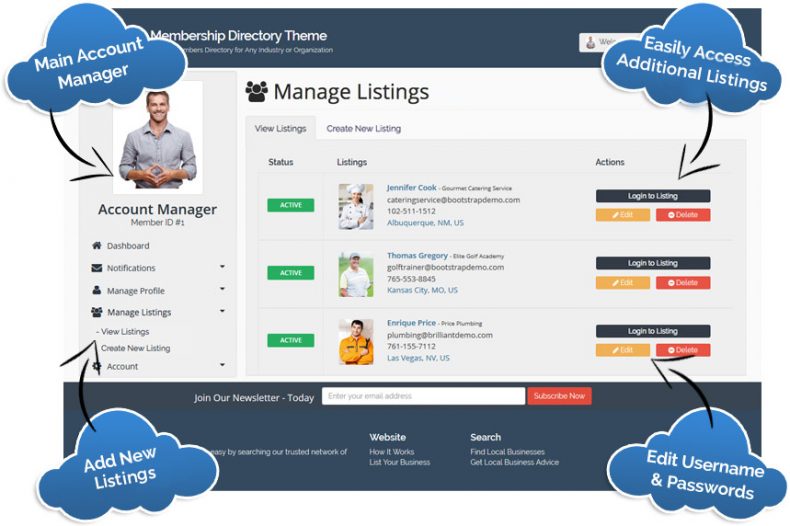
The Multi-Member Manager add-on allows individual members to manage multiple listings from one master account. The main account holder can quickly create, edit, and switch between multiple business listings.
Perfect for websites that list banks, restaurant chains, retail stores, real estate firms, and more!
One member login to create & manage multiple listings
Easily toggle between each listing account
Easily activate & deactivate listings
Each listing has its own unique login username and password
Each listing is searchable in the directory
Each listing is optimized for search engines
Any additional listings that are created will be the same membership level of the main account holder.
Additional listings will also have the same privileges as the main account holder. The only difference is that these newly created listings can not create additional listings themselves – only the main account holder can create additional listings.
Who Is This For?
The Multi-Member Manager add-on is highly versatile and works for many different scenarios. Here are a few common ways additional listings would benefit your members:
EXAMPLE 1: A business might have multiple locations or branches around the country. Using the Multi-Member Manager add-on, the main account manager can publish individual business listings for each of the locations – all with unique addresses, phone numbers, and other important information that is unique to each location.
EXAMPLE 2: Talent or modeling agencies using the Multi-Member Manager add-on can easily setup individual profiles for each of their clients, such as bands, actors, models, etc. Each profile is unique and searchable on your website. The main account manager can easily navigate between these listings to update profile photos and other details within each listing.
EXAMPLE 3: One of your members might be a large company with many employees. As the main account manager, they can setup individual employee listings for each of their staff members. For example, a real estate firm can set up individual profiles for each of their agents that service different geographical locations. Each agent will then have their own unique listing with their own login username and password. These listings can be found in the directory based on their geographical location.
Multi-Member Manager Add-On Members Can Create Additional Listings
Safe & Secure. Try it free for as long as you like.
What customers say
Trusted by teams building real businesses
It's easy to get a directory business up and running
If you're looking for an out of the box directory business solution, then Brilliant Directories is for you. Once you've gone through the main settings which should take you a day you'd be ready to showcase your site. There are tons of video tutorials on YouTube and inside the customer dashboard. There are so many ways you can customize your site and it's very SEO friendly. Brilliant Directories is built on Bootstrap which makes it easy to customize however you want. Looks very professional!
Making a living off my Brilliant Directories websites
I have been working with different directory web platforms like Wordpress, 6Cube, SEOSamba and others for over 20 years. About three years ago I found out about Brilliant Directories, since then I have built 10 directories. First, the websites and pages are Google friendly right out of the box, this is one of the most important parts of a good platform to me. Second, the software is very easy to use and there is lots of help to build your site... I no longer have a regular job because I am making a living off of my 10 Brilliant Directories.
I chose Brilliant Directories because it had everything I needed when I was looking to create my membership website. The support and community inside Brilliant Directories is a great help, and you have access to literally thousands of other BD website owners who all come together to share their experiences, tips and help. If you are looking to create a directory, I can not recommend Brilliant Directories enough. No matter what you are wanting to do, there is a theme suitable for your needs!
Brilliant Directories is the one you should choose
All the people in the support staff have been amazing. In less than 30 days I've been able to put together a membership website that can generate money and I am greatly appreciative of everything they do and all the knowledge they have. Thank you for all the webinar trainings. You guys don't need to do that kind of stuff - but that's what I love most. If you haven't picked a membership program yet, Brilliant Directories is the one you should choose.
I went into my venture alone, but was pleasantly surprised at the community and the Brilliant Directories support team. The staff is super responsive and it truly feels like they are rooting for us. On top of this, there are great discussions and support within the Facebook group, where I manage to learn something new from other membership website owners every day. It's an amazing and continuously evolving product and I'm happy to be a part of it!
The sky is the limit with what you can do on the Brilliant Directories platform. I love the fact that everything can be customised and there are constant improvements and additions. The support, advice and guidance that one receives through the BD Facebook group, Webinars and Support team is excellent and I would highly recommend it to anyone wanting a directory type website.
We love BD. After using other website platforms for our business, BD has helped to grow our company in ways we couldn't have imagined. If you are serious about starting an online directory we highly recommend that you use BD. They have more settings and built-in tools than we initially thought - which helps tremendously. It's so easy that once you start your first project, you want to launch even more website ideas on the platform... You won't be sorry!
After many long days testing different platforms, it was a relief to find Brilliant Directories. Not only does the platform have the features I required, it was affordable and the support is second to none. I managed to achieve things with BD that I never imagined I could do by myself... Money which would have been spent on developers has gone into marketing my site. BD has a very strategic approach in the growth of the platform and it is clear to see customers are at the forefront of that approach.
One of the best business decisions we've ever made
We switched to BD about a year ago, and it's one of the best business decisions we ever made. Our website now is user-friendly, and our members can easily update their profiles and add content on their own. But what I love most about BD is that they are constantly adding new features, and they seem to really care about their clients... We struggled through various platforms, from WordPress to very expensive custom-built websites. None came close to being as functional or reliable as our BD website.
After working with the Brilliant Directories team for the past 5 years, I've enjoyed building our websites and learning new ways to improve. Having access to a responsive support team has been very important for our success. Thanks to everyone at Brilliant Directories for guidance, constant improvements, Facebook groups and interactive webinars! We've already built one directory (www.NJwedding.com), launched another (www.NJparenting.com) and have more ideas to implement very soon.
It's easy to get a directory business up and running
If you're looking for an out of the box directory business solution, then Brilliant Directories is for you. Once you've gone through the main settings which should take you a day you'd be ready to showcase your site. There are tons of video tutorials on YouTube and inside the customer dashboard. There are so many ways you can customize your site and it's very SEO friendly. Brilliant Directories is built on Bootstrap which makes it easy to customize however you want. Looks very professional!
Making a living off my Brilliant Directories websites
I have been working with different directory web platforms like Wordpress, 6Cube, SEOSamba and others for over 20 years. About three years ago I found out about Brilliant Directories, since then I have built 10 directories. First, the websites and pages are Google friendly right out of the box, this is one of the most important parts of a good platform to me. Second, the software is very easy to use and there is lots of help to build your site... I no longer have a regular job because I am making a living off of my 10 Brilliant Directories.